
threet
Đọc Threads trong vỏ Google Sheets.Read Threads in a Google Sheets disguise.
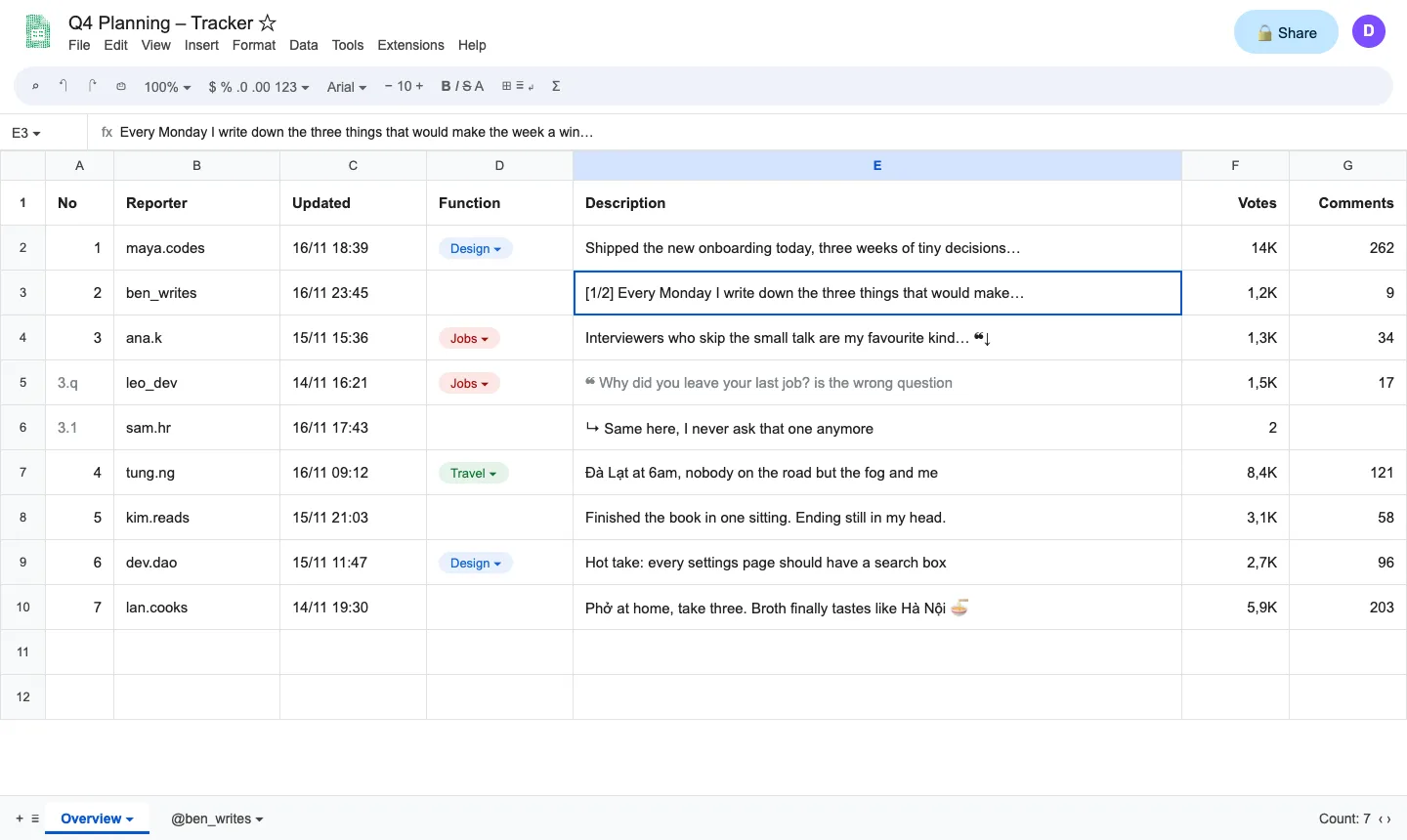
Trên threads.com, threet phủ lên trang một bản Google Sheets dùng được thật: mỗi bài đăng là một dòng, trả lời và bài trích dẫn có dòng riêng, mỗi thread mở thành một sheet tab. Ai đi ngang qua, bấm Esc là chuyển sang bảng "Q4 Budget". Không cần API key, không có máy chủ: bài được đọc và hiển thị ngay trong trình duyệt của bạn.On threads.com, threet covers the page with a working copy of Google Sheets: one post per row, replies and quoted posts on their own rows, every thread opened as a sheet tab. Someone walks by, press Esc for a dull "Q4 Budget" sheet. No API key and no server: posts are read and shown right in your browser.
- Feed thành các dòng: tác giả, thời gian, chủ đề, nội dung, lượt thích và trả lời
- Thread và thread con mở thành sheet tab, đánh số theo độ sâu
- Esc chuyển sang bảng tính giả, ⌥T hiện lại trang Threads thật
- Điều khiển hoàn toàn bằng bàn phím, F1 xem phím tắt
- Chỉ đọc: không thích, đăng hay trả lời thay bạn
- Your feed as rows: author, time, topic, text, likes and replies
- Threads and sub-threads open as sheet tabs, numbered by depth
- Esc for a decoy sheet, ⌥T to show the real Threads page
- Keyboard first; F1 lists every shortcut
- Read-only: never likes, posts or replies for you
Cách cài (4 bước)How to install (4 steps)
- Tải file ZIP rồi giải nén vào một thư mục bạn sẽ giữ lại.
- Mở chrome://extensions và bật Developer mode.
- Bấm Load unpacked, chọn thư mục có file manifest.json.
- Mở threads.com và đăng nhập như bình thường.
- Download the ZIP and extract it into a folder you will keep.
- Open chrome://extensions and turn on Developer mode.
- Click Load unpacked and pick the folder with manifest.json.
- Open threads.com and log in as usual.
Chrome · Chromium (Manifest V3) · Apache-2.0 · Phát hành 17/11/2026Released 17 Nov 2026